
Review: Rechargeable Tuya Zigbee Smart Push Button
TL;DR I never got this working, would not recommend.
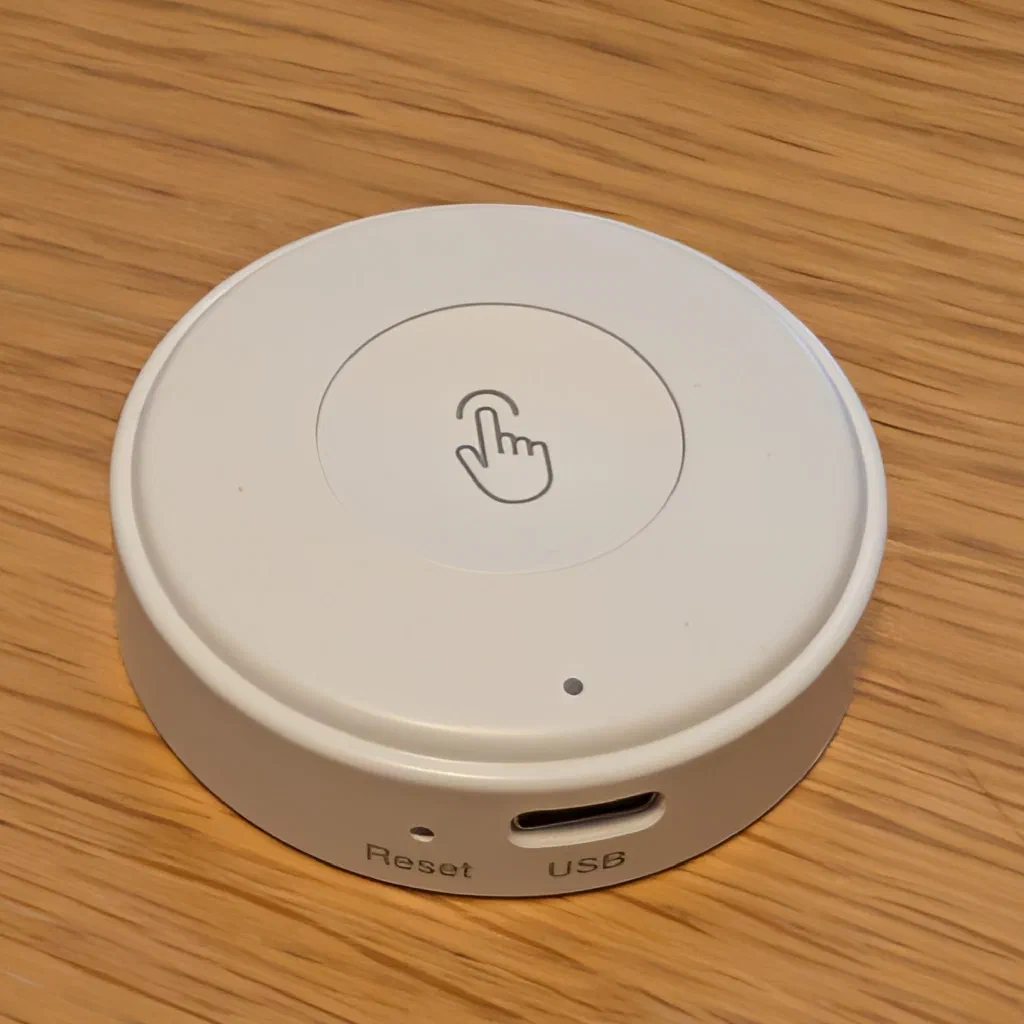
What It Is
It’s sold on AliExpress as a “Rechargeable Tuya Zigbee Smart Push Button Wireless Switch Remote Control Automation Scenario Switch Work with Zigbee Gateway”, which is a lot of words for one button. It’s listed at £7.99 (or £7.63 each if you want ten)1.
It’s a pretty normal-looking Zigbee button, with one big button on top and a USB-C2 port on the edge, so there are no coin cells to swap. The AliExpress listing was light on everything else though. It didn’t say how big the battery is or how long a charge lasts, or explicitly call out Home Assistant or ZHA support, but I thought it was worth a punt.
Pairing with ZHA
Pairing with ZHA was fine. It joined straight away, but showed up as a switch rather than a button, but I’ve seen this before when a quirk is missing, so I wasn’t too worried.
A switch entity on a remote is no use: what you want from a button is an event for each press (single, double, long) to hang automations off. ZHA didn’t create any of those, so I tried a quirk to turn it into a proper remote.
The button reports itself as manufacturer _TZ3001_2kjvanir, model TS0041. ZHA already has a quirk for Tuya’s one-button TS0041 remotes (TuyaSmartRemote0041TO), but this one adds an Identify cluster to its signature, so the stock quirk doesn’t match. I wrote a custom quirk, TuyaSmartRemote0041TOIdentify, which is the stock one with Identify added. While it was configuring the button, it also sent the Tuya “magic packet”3 and bound the On/Off cluster to the coordinator.
Here it is, in case it’s any use to someone whose button is better behaved than mine. It lives in custom_zha_quirks/tuya_ts0041_identify.py:
 1"""TS0041 single-button remote variant that also reports the Identify cluster.
 2
 3Some TS0041 buttons (e.g. _TZ3001_2kjvanir) add Identify (0x0003) to their
 4input clusters, so the upstream TuyaSmartRemote0041TO quirk doesn't match
 5and ZHA shows the button as an on/off switch instead of a remote.
 6This reuses the upstream quirk and its button triggers, adding Identify, and
 7on configure sends the Tuya magic packet and binds On/Off to the coordinator.
 8"""
 9
10import logging
11
12from zigpy.profiles import zha
13from zigpy.zcl.clusters.general import Basic, Identify, OnOff, Ota, PowerConfiguration, Time
14
15from zhaquirks.const import (
16    DEVICE_TYPE,
17    ENDPOINTS,
18    INPUT_CLUSTERS,
19    MODEL,
20    OUTPUT_CLUSTERS,
21    PROFILE_ID,
22)
23from zhaquirks.tuya import TuyaNoBindPowerConfigurationCluster, TuyaSmartRemoteOnOffCluster
24from zhaquirks.tuya.ts0041 import TuyaSmartRemote0041TO
25
26_LOGGER = logging.getLogger(__name__)
27
28
29class TuyaSmartRemote0041TOIdentify(TuyaSmartRemote0041TO):
30    """Tuya 1-button remote with Identify and time on out."""
31
32    signature = {
33        MODEL: "TS0041",
34        ENDPOINTS: {
35            1: {
36                PROFILE_ID: zha.PROFILE_ID,
37                DEVICE_TYPE: zha.DeviceType.ON_OFF_SWITCH,
38                INPUT_CLUSTERS: [
39                    Basic.cluster_id,
40                    PowerConfiguration.cluster_id,
41                    Identify.cluster_id,
42                    OnOff.cluster_id,
43                ],
44                OUTPUT_CLUSTERS: [Time.cluster_id, Ota.cluster_id],
45            },
46        },
47    }
48
49    replacement = {
50        ENDPOINTS: {
51            1: {
52                PROFILE_ID: zha.PROFILE_ID,
53                DEVICE_TYPE: zha.DeviceType.REMOTE_CONTROL,
54                INPUT_CLUSTERS: [
55                    Basic.cluster_id,
56                    TuyaNoBindPowerConfigurationCluster,
57                    Identify.cluster_id,
58                    TuyaSmartRemoteOnOffCluster,
59                ],
60                OUTPUT_CLUSTERS: [Time.cluster_id, Ota.cluster_id],
61            },
62        },
63    }
64
65    # device_automation_triggers (button 1 short/double/long press) are
66    # inherited from TuyaSmartRemote0041TO.
67
68    async def apply_custom_configuration(self, *args, **kwargs):
69        """Wake the button's press reporting during (re)configure.
70
71        - Tuya "magic packet": reading these Basic attributes switches many
72          Tuya remotes into sending press events (0xFD commands).
73        - Bind the On/Off cluster to the coordinator so presses are sent to
74          Home Assistant; ZHA doesn't bind this server cluster on its own.
75        """
76        # The button is only awake for a few seconds after joining, so do the
77        # steps it answers quickly first and bind straight away. Attribute
78        # 0xFFFE gets no reply from this firmware (the read times out after
79        # ~30 s), so it goes last as a best effort.
80        endpoint = self.endpoints[1]
81        basic = endpoint.in_clusters[Basic.cluster_id]
82        try:
83            await basic.read_attributes([4, 0, 1, 5, 7])
84        except Exception as exc:  # noqa: BLE001 - sleepy device may not answer
85            _LOGGER.debug("%s: Tuya magic packet failed: %s", self.ieee, exc)
86        try:
87            result = await endpoint.in_clusters[OnOff.cluster_id].bind()
88            _LOGGER.warning("%s: On/Off bind result: %s", self.ieee, result)
89        except Exception as exc:  # noqa: BLE001
90            _LOGGER.warning("%s: On/Off bind failed: %s", self.ieee, exc)
91        try:
92            await basic.read_attributes([0xFFFE])
93        except Exception as exc:  # noqa: BLE001
94            _LOGGER.debug("%s: attribute 0xFFFE not answered: %s", self.ieee, exc)
95        await super().apply_custom_configuration(*args, **kwargs)
On paper, that worked. The quirk matched, the bind came back as a success, and ZHA gave the device short, double and long press triggers. It just never fired any of them.
So I turned on debug logging for zigpy and ZHA and pressed the button. Every other device on the network showed up in the logs, and the button sent nothing at all. The only thing I ever got out of it was a single “on_off = 0” state report, once, in the whole session. With no frames arriving, there’s nothing a quirk can fix. My best guess is that it sends its presses somewhere other than the coordinator, but I couldn’t find out where.
Pros and Cons
The Good4
- Paired with ZHA without any fuss
- Rechargeable over USB-C, so no coin cells to buy
- Looks tidy, and the button has a nice big target
The Not So Good
- Shows up in ZHA as a switch, not a button
- Not a single button press reached ZHA, even with a custom quirk and debug logging on
- The listing gives almost no useful specs
Final Thoughts
If you’re on ZHA, I’d skip this one. It might behave better with Zigbee2MQTT (which has a TS0041 page, though it doesn’t list this exact _TZ3001_2kjvanir variant) or a Tuya gateway, but I can’t vouch for either, and since Tuya reuses listing names across different hardware, check that the exact model is supported before buying.
-
I paid £7.90 🤷♂️. ↩︎
-
The reason I picked up this model was that it’s USB rechargeable. ↩︎
-
A read of a handful of Basic cluster attributes, which persuades a lot of Tuya devices to start behaving like their proper selves. Not this one. ↩︎
-
Not that this really matters as I never got it working well enough to use. ↩︎