
Teaching Home Assistant to Speak Bosch Air Con
I’ve jumped back on the Home Assistant train recently, and having just had some AC installed, this seemed like the perfect time to boost the system’s SO approval factor1.
I have a Bosch Climate 3200i split air con in the living room, and a cheap Zigbee IR blaster pointed at it. All I wanted was to control it from Home Assistant like any other thermostat. How hard could that be? It turned out to need a custom ZHA quirk, a workaround for a firmware bug, decoding the remote’s IR protocol from nine button presses, and a small custom integration.
The Hardware
- The AC: a Bosch Climate 3200i.
- The blaster: a HOBEIAN ZG-IR01 from AliExpress, a battery-powered Zigbee IR blaster with temperature and humidity sensors built in.
- The hub: Home Assistant with ZHA2.
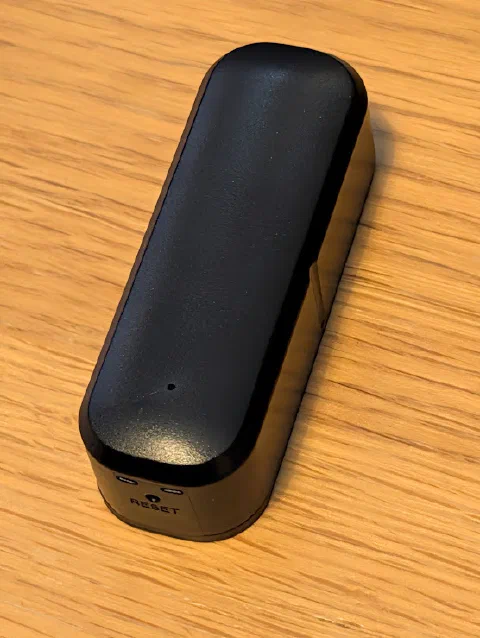
The HOBEIAN ZG-IR01
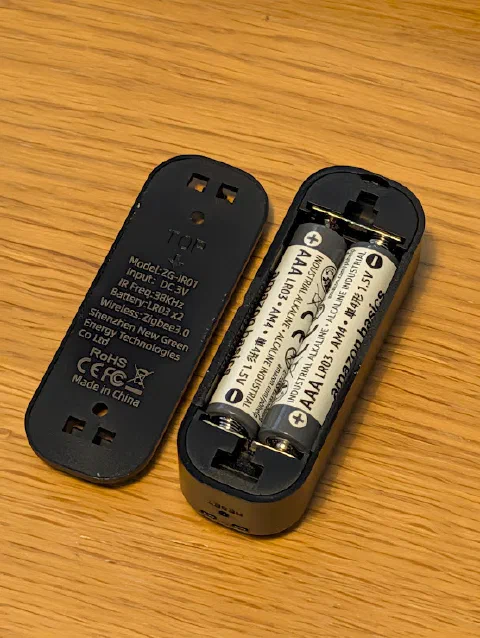
Two AAAs inside, which matters later
It Pairs, But That’s About It
The ZG-IR01 paired with ZHA straight away, which felt far too easy. It was. The device page showed three clusters labelled simply “Cluster”: 0xE004, 0xED00 and 0xEF00. That’s ZHA’s way of saying it can see the device but has no quirk for it, so none of the IR learn or send commands were usable.
The device signature gave the game away:
1"manufacturer": "HOBEIAN",
2"model": "ZG-IR01",
3"input_clusters": ["0x0000", "0x0001", "0x0003", "0x0004", "0x0005", "0x0006",
4                   "0x0402", "0x0405", "0xe004", "0xed00", "0xef00"]
0xE004 and 0xED00 are the Zosung IR Control and IR Transmit clusters used by the popular Tuya ZS06/TS1201 blasters. zha-device-handlers already ships a quirk for those (zhaquirks.tuya.ts1201), so all the IR logic existed. It just didn’t recognise this manufacturer and model.
The Custom Quirk
A custom quirk only needs to subclass the existing blaster and give it the right signature:
 1from zhaquirks.tuya.ts1201 import ZosungIRBlaster, ZosungIRControl, ZosungIRTransmit
 2
 3class HobeianZGIR01(ZosungIRBlaster):
 4    signature = {
 5        MODELS_INFO: [("HOBEIAN", "ZG-IR01")],
 6        ENDPOINTS: {
 7            1: {
 8                PROFILE_ID: zha.PROFILE_ID,
 9                DEVICE_TYPE: zha.DeviceType.ON_OFF_LIGHT,
10                INPUT_CLUSTERS: [
11                    Basic.cluster_id, PowerConfiguration.cluster_id,
12                    Identify.cluster_id, Groups.cluster_id, Scenes.cluster_id,
13                    OnOff.cluster_id, TemperatureMeasurement.cluster_id,
14                    RelativeHumidity.cluster_id,
15                    ZosungIRControl.cluster_id, ZosungIRTransmit.cluster_id,
16                    0xEF00,
17                ],
18                OUTPUT_CLUSTERS: [Identify.cluster_id],
19            },
20        },
21    }
22    # replacement: the same list with the Zosung cluster classes swapped in
That’s trimmed down. The full quirk, hobeian_zg_ir01.py, is in the project’s repo along with everything else in this post.
Drop it in /config/custom_zha_quirks/ and point ZHA at it:
1zha:
2  custom_quirks_path: /config/custom_zha_quirks/
Then restart Home Assistant fully, because reloading ZHA isn’t enough. After the restart the device reported quirk_applied: true, and the clusters showed up with proper names.
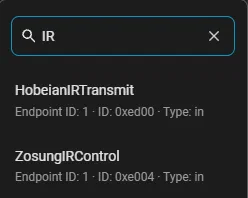
The IR clusters, now with names (HobeianIRTransmit is the fix from the next section)
Learning Worked, Sending Didn’t
Learning a code is a cluster command:
- Issue
IRLearn(on_off: true) on cluster0xE004, and the blaster’s LED lights up. - Point the remote at the blaster and press a button.
- Read the
last_learned_ir_codeattribute from0xE004.
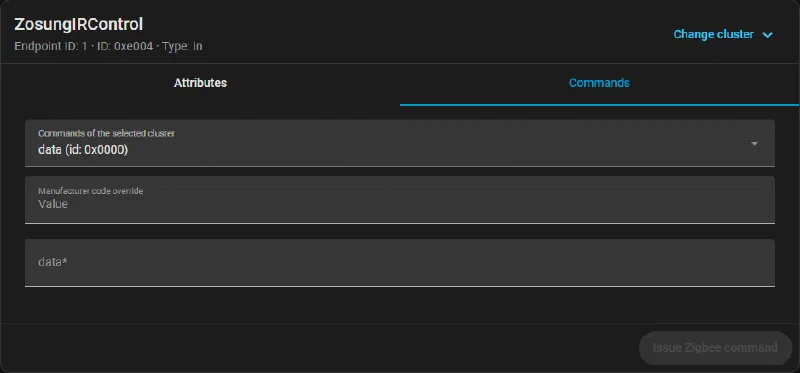
Poking the IR Control cluster by hand from ZHA
That worked first time. The Off button gave me a base64 string starting JgD….
Sending it back did nothing at all. The AC didn’t react, and Home Assistant didn’t report a single error.
The Firmware Bug
With debug logging turned on for zhaquirks.tuya.ts1201 and zigpy.zcl, I could finally see what was going on:
TX  receive_ir_frame_00(seq=3, length=350, ...)     # "here comes a 350-byte message, seq 3"
RX  receive_ir_frame_01(seq=3, length=350, ...)     # blaster acknowledges
RX  receive_ir_frame_02(seq=0, position=0, maxlen=64)   # "send me the first chunk of... seq 0?"
    Ignoring IR frame 0x02 for unknown seq 0
The raw frame, 11 73 02 00 00 00 00 00 00 40, confirmed it: the sequence bytes are always 00 00. This firmware never echoes back the sequence number it was given. The upstream quirk looks up the outgoing message by sequence number, finds nothing for seq 0, and quietly drops the request. The blaster then sits there waiting for data that’s never coming.
The fix is a bit of a bodge: if the blaster asks for an unknown (or zero) sequence number, hand it the most recently queued message.
 1class HobeianIRTransmit(ZosungIRTransmit):
 2    """This firmware always requests chunks with seq=0."""
 3
 4    def handle_cluster_request(self, hdr, args, *, dst_addressing=None):
 5        pending = self.endpoint.device.ir_msg_to_send
 6        if hdr.command_id == self.ServerCommandDefs.receive_ir_frame_02.id and (
 7            args.seq == 0 or args.seq not in pending
 8        ):
 9            latest = next((s for s in reversed(pending) if s != args.seq), None)
10            if latest is not None:
11                pending[args.seq] = pending[latest]
12        return super().handle_cluster_request(hdr, args, dst_addressing=dst_addressing)
Swap HobeianIRTransmit into the quirk’s replacement, restart (fully, again), send Off, and the AC switched off. Progress!
Do I Really Have to Learn Every Button?
An AC remote doesn’t send “temperature up”. Every press sends the whole state: mode, temperature and fan speed. Five modes, 14 temperatures and six fan speeds works out at hundreds of button presses, and I didn’t fancy that3. So instead I had a look at what was inside the codes.
What the Blaster Stores
The key_code is Broadlink-style: a 0x26 header, a length, then pulse durations in ticks of 1/32768 s. Decoding the pulses gives a fairly standard NEC-like pattern:
| Element | Duration |
|---|---|
| Header | ~4.2 ms mark, ~4.2 ms space |
| Bit mark | ~490 µs |
0 space | ~490 µs |
1 space | ~1.5 ms |
| Gap between frames | ~4.9 ms |
Turning the spaces into bits, the first two captures came out as:
Off                    B2 4D 7B 84 E0 1F   (×2)
Cool, 22 °C, fan auto  B2 4D BF 40 70 8F   (×2)   +   D5 66 00 00 00 3B
Every byte is followed by its bitwise inverse (B2/4D, 7B/84…), and the frame starts with B2. That’s the Midea “Coolix” protocol, and B2 7B E0 is the well-known Coolix power-off frame. It turns out my Bosch is a Midea under the skin4.
The Coolix State
Ignoring the inverse bytes, each state is three bytes: B2 <fan> <temp+mode>. Here’s the capture set to cool at 22 °C with the fan on auto:
B2header4D~headerBFfan40~fan70temp + mode8F~temp + modeThe main frame, sent twice. Every other byte is the inverse of the one before it.
The fan byte is the fan level in the top three bits, and the bottom five are always 11111:
101fan: auto11111always 1The fan byte, BF
The temp/mode byte starts with the temperature, from a 4-bit Gray-code-ish table (17 °C = 0000, 22 °C = 0111, 30 °C = 1011…), then the mode: cool 00, dry 01, auto 10, heat 11.
0111temp: 22 °C00mode: cool00always 0The temp/mode byte, 70
So far so good.
Fan Speed as a Percentage
The Bosch remote doesn’t do low, medium and high. It shows the fan as a percentage. That explained a capture set to cool at 17 °C with the fan at 20 %, which looked wrong:
B2 4D FF 00 00 FF (×2) + D5 14 00 00 00 E9FF means fan bits 111, which isn’t a normal Coolix speed. The answer was in the third frame, Midea’s extended frame:
D5header14fan: 20 %000000unknown, always 0E9checksumThe extended frame for cool at 17 °C with the fan at 20 %. No inverses this time.
0x14is 20, so 20 %, and0x66(102) is Midea’s value for auto.- The checksum is the sum of the other bytes:
D5 + 14 = E9, andD5 + 66 = 13B, so3B.
So the exact speed lives in the extended frame, and the main frame carries a rough fan level for older units. Six more captures pinned down the mapping and the rest of the modes:
| Setting | Main-frame fan bits | Extended frame value |
|---|---|---|
| Auto | 101 | 102 |
| ≤ 20 % | 111 | the % |
| ≤ 40 % | 100 | the % |
| ≤ 60 % | 010 | the % |
| > 60 % | 001 | the % |
| Dry or Auto mode (fan ignored) | 000 | 101 |
| Off | n/a (no extended frame) | n/a |
Fan-only mode is just dry mode with a special temperature code, 1110.
Does It Actually Work?
I wrote an encoder (coolix.py) from that table and checked it against all nine captures (off; cool at 22 °C, fan auto; cool at 17 °C, fan 20 %; heat at 21 °C with the fan at 40, 60 and 100 %; fan only at 60 %; dry at 24 °C; and auto at 24 °C). Every one came out identical, bit for bit.
Then the real test: heat at 23 °C with the fan at 60 %, a state I’d never learned, generated from scratch and sent to the AC. It beeped and switched to heat at 23 °C. No more learning codes, ever5.
There was one more scare along the way. The first “cool” test showed -- on the AC’s display, and I assumed I’d broken something. I hadn’t. It’s a mode conflict: the living room unit shares its outdoor unit with another indoor unit, which was heating at the time, and a shared outdoor unit can’t heat and cool at once.
A Proper Home Assistant Integration
The usual answer for IR climate devices is SmartIR, so I checked that first. Its current release doesn’t support ZHA blasters, and it works from a fixed table of codes anyway. As I can now generate any code I want, a small integration of my own was simpler, and it covers every temperature and fan percentage.
bosch_ir
custom_components/bosch_ir/
├── __init__.py        # config-entry setup, reload on options change
├── manifest.json      # config_flow: true, depends on zha
├── const.py
├── config_flow.py     # UI setup + Configure (options) flow
├── climate.py         # the climate entity
├── coolix.py          # the encoder
├── strings.json
└── translations/en.json
It’s all on GitHub at egelmex/ha_bosch_ir, along with the quirk, the decoded protocol, the nine captures and a script that checks the encoder against them. You can install it through HACS as a custom repository, and the README has the details. If you’ve got another Midea-built AC, I’d love to hear whether it works.
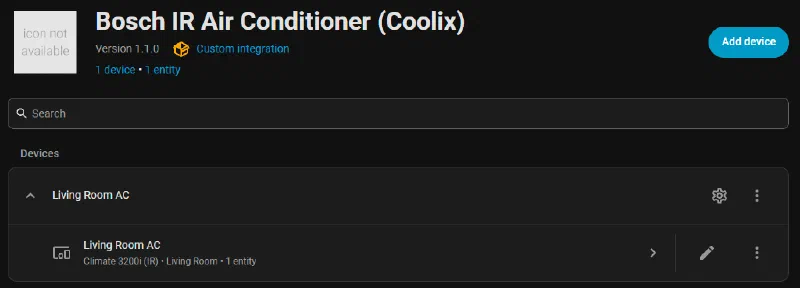
Setup is all in the UI (Settings → Devices & services → Add integration → Bosch IR):
- Name and IR blaster: a device picker filtered to ZHA devices. It reads the blaster’s IEEE address from the device registry, and won’t let you add the same blaster twice.
- Room sensors and fan speeds: the blaster’s own temperature and humidity sensors are picked by default, and the fan speeds are a multi-select from 10 to 100 %.
Both can be changed later from Configure.
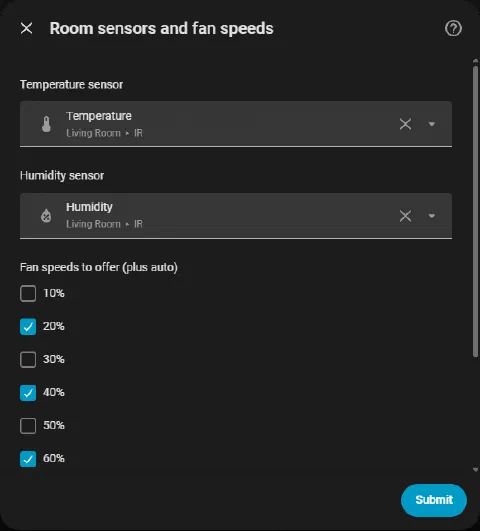
The Configure dialog
The AC shows up as its own device, connected via the blaster.
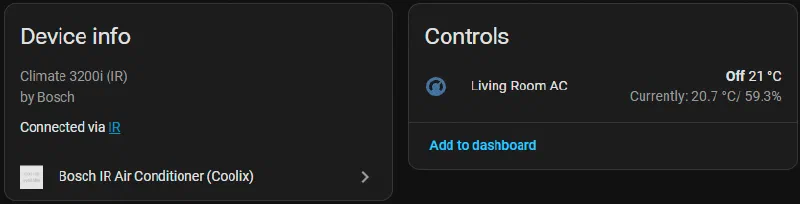
The entity (climate.living_room_ac) gives you:
- HVAC modes: off, cool, heat, dry, fan only, and heat/cool (the AC’s auto)
- Target temperature: 17 to 30 °C in 1 °C steps
- Fan modes: auto plus whichever percentages you picked
- Current temperature and humidity: from the blaster’s sensors
- Turn on: goes back to the last mode used
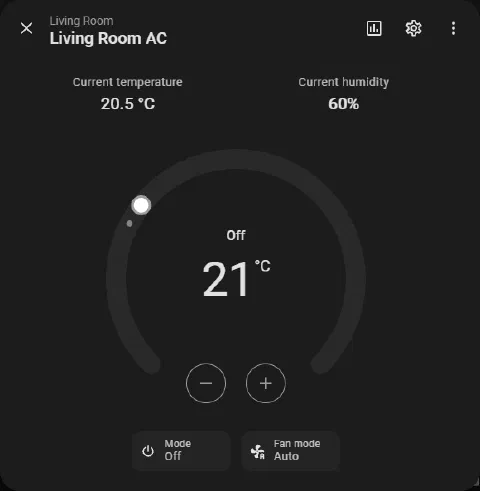
A proper thermostat, at last
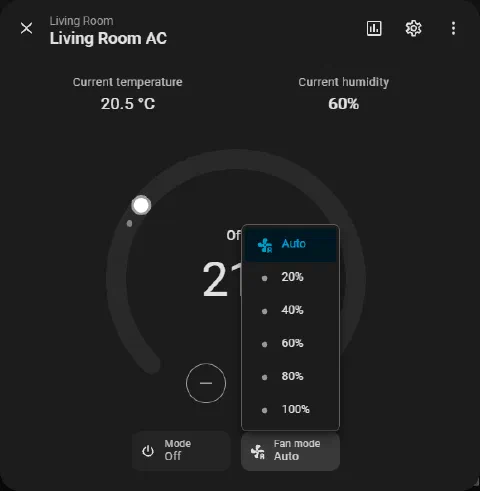
The fan speeds, as percentages like the real remote
Every change encodes the full state and sends it with zha.issue_zigbee_cluster_command:
 1await self.hass.services.async_call(
 2    "zha", "issue_zigbee_cluster_command",
 3    {
 4        "ieee": self._ieee, "endpoint_id": 1,
 5        "cluster_id": 0xE004, "cluster_type": "in",
 6        "command": 2, "command_type": "server",
 7        "params": {"code": encode("heat", 23, 60)},
 8    },
 9    blocking=True,
10)
There are two catches. Because the firmware always asks for seq 0, it can only cope with one outgoing message at a time, so the entity sends under a lock and then waits about 1.5 s while the code goes over in chunks. And IR is one-way, so the entity is marked assumed_state. If someone picks up the actual remote, Home Assistant has no idea.
Final Thoughts
I’ve only just implemented this so it’s going to take a bit of testing to see if it gets the SO approval stamp. There is also probably an easier way of doing this, so if you know hit me up on socials with some details.
There are still a few things on the list. The blaster can only hear IR in learn mode, so in theory it could sit in learn mode and decode the real remote’s presses back into a state, but on a blaster running off two AAAs that would flatten them in no time6. Swing, turbo, sleep and ioniser are separate Coolix commands I haven’t captured yet, and I suspect those three zero bytes in the extended frame are hiding some of them. And I really should report the seq 0 behaviour upstream to zha-device-handlers so the ZG-IR01 just works for the next person. A project for another day.
-
Significant other, the toughest Home Assistant user there is. ↩︎
-
Running on the ZZH-P stick I upgraded to a while ago. ↩︎
-
The naive count is 5 modes × 14 temperatures × 6 fan speeds = 420. Being generous, and using what I found out later, dry and auto ignore the fan speed and fan only ignores the temperature, so the lower bound is: cool and heat at 14 × 6 = 84 each (168), dry and auto at 14 each (28), fan only at 5 speeds (5), plus off (1), for 202 codes. That’s 202 rounds of learn mode, point, press and read the attribute back, and that’s before counting the presses needed to get the remote into each state in the first place. ↩︎
-
Bosch’s Climate range is built by Midea, which explains it. ↩︎
-
OK, I could add some of the extra settings like ioniser, but that’s a job for another day. ↩︎
-
A USB-powered blaster would be a much better fit for this. I had a wifi one before, which had local control but it’s since died, and getting it on the wifi was a pain. ↩︎