
Beg Button - Part 2: The Rust Rewrite
In 2024 I took a beg button, with a screen in it, to EMF as a little installtion for our village, this year with the best laid plans I entended to “make it better”, starting with the software running the whole thing.
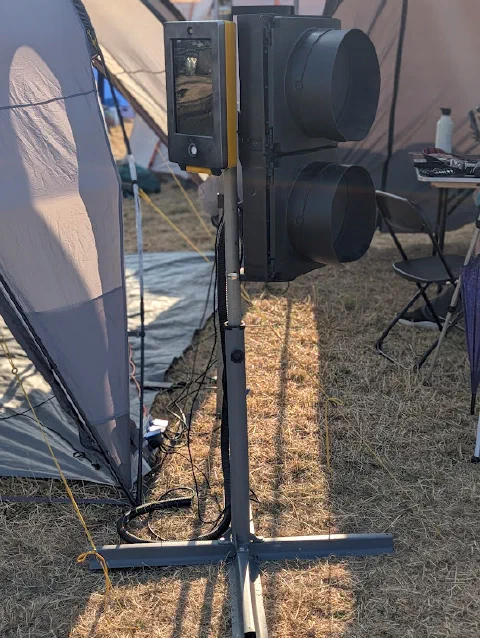
The Beg Button at EMF
At the end of the last post about the beg button (two years ago) I said I “might even re-write everything in a more performant engine as an excuse to learn a new tool”1. Well, here we are. This is the second post about the same beg button, and it is the story of taking the whole thing from Python and pygame to Rust and raylib.
As a reminder of what this thing does: press the button, get a randomised WAIT, then after a few seconds get told to NAP, DRINK, SING, or GEHEN, complete with icon, sound, and (sometimes) an effect on the screen. That part hasn’t changed. What has changed is basically everything underneath it.
The Direct Port
I didn’t want to redesign the thing from scratch and spend weeks rediscovering bugs I’d already fixed once in Python, so the first pass was a deliberately boring 1:1 port. Same state machine, idle to wait to walk and back to idle. Same GPIO pins2. Same list of actions and waits, just translated line by line.
I had Claude do that first pass3: point it at the pygame source, point it at raylib, get a compiling Rust program that behaves the same as the old one. It got me a working skeleton in an afternoon rather than a week. This in theory left me plenty of time to get some new features working before EMF4.
Shaders, Finally
As I mentioned in my previous post pixel shaders were the original plan for effects, and that pygame’s OpenGL support wasn’t up to it, and that the Pi 4 only supports OpenGL 2.1 while the shader libraries I found all wanted 3.0. None of that has changed about the Pi 4. What’s changed is that raylib will happily talk OpenGL ES 2.0 instead, which is close enough to what the Pi actually offers that shaders are finally on the table5.
Rendering the UI to a Texture, Not the Screen
The pygame version drew straight to the screen surface. The Rust version renders the whole UI, icon, text, wait bar, to an off-screen texture first, and only then composites that texture onto the screen through whatever shader is active for the current action.
That sounds like a detail but it’s the reason the new effects can exist at all. A shader that wants to rain on the UI or distort it needs the UI as a texture it can sample from, not something already blitted straight to the framebuffer. Once the UI became just another texture, the crossing signal graphics stopped being a special case.
Writing Shaders….
I am new to shaders, like I mean super green, so after bodging together a quick test to see if shaders would work at all I hopped no https://www.shadertoy.com/ and thought how hard could it be to to port some rain effects to the badge6. It turns out, harder than I expected, and I got very frustrated one the first few attempts, so I put this part of the project on the back burner, as I had plenty of time left….
A Catalog Instead of a Wall of Constructors
In Python every action was a line in one big list: Action("NAP", "hammock-and-man.svg"), Action("KEEP DRY", "umbrella.svg", sounds=[Mp3Sound("thunder.mp3")], effect=[Rain()]), and so on for a couple of dozen entries. Content and code lived in the same file.
Actions now live in assets/catalog.yaml instead:
1actions:
2  - text: "GET WET"
3    icon: "pedestrian-walking.svg"
4    bg: "BLUE"
5    sounds: []
6    effect: "WaterDroplets"
7    area: "full_screen"
The catalog also picked up a field the Python version never had, area, so an effect can declare itself icon_area (the small icon panel, as before) or full_screen (take over the whole display, which the water simulation wants).
Getting It Back onto a Pi
Cross-compiling Rust for aarch64 from a dev machine turned into its own small yak shave. There’s now a set of scripts that produces a zip with the binary and every asset it needs, tuned for cortex-a72. make pi-release, but working out how to do that took a while7.
That’s the software side sorted, at least well enough to run at EMF. The hardware it’s bolted to, a set of Walk/Stop lights and the mount that took several tries to get right, is its own story: Part 3 covers the hardware.
-
I stand by that plan, even if “an excuse to learn a new tool” turned out to mean several new tools at once. ↩︎
-
Down to the pin numbers. Whatever else changed, the wiring in the box did not care that the code driving it got rewritten. ↩︎
-
Yes, that Claude. It is very good at translating one working program into another working program in a different language when you already know exactly what the first one is supposed to do, and considerably less interesting to use for the parts where you don’t yet know the answer. ↩︎
-
I started this project weeks before EMF, I would have plenty of time to get some new features in right? ↩︎
-
In case you were wondering why I didn’t just fix the pygame OpenGL situation instead of rewriting the whole application, so was I for a while. ↩︎
-
We still have like two months left before EMF plenty of time right? ↩︎
-
If you are really interested, the commit history for this project is exactly as tidy as you would expect from commit messages like “fixeds” and “wip”. ↩︎