
Exposing Dev Container Web Apps to NetBird Reverse Proxy
I was working on a web app in a VS Code dev container on my Windows machine, under WSL2, and wanted to give a preview to a friend without having to set up proper hosting. So I set up NetBird’s reverse proxy1 to point at it, and got nothing.
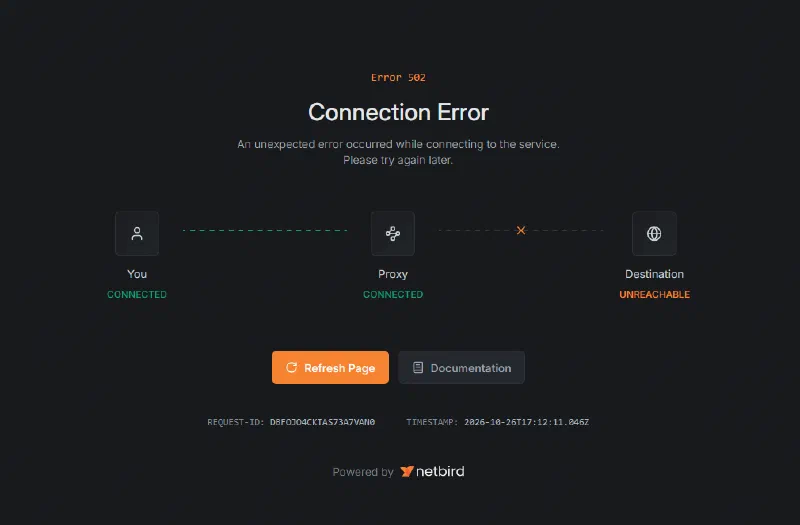
The proxy could see me, but not the dev server.
Which was odd, because the app was running fine in the dev container, and loaded happily on Windows on localhost:5174.
The Setup
- The app: a SvelteKit app running on Vite’s dev server inside a dev container.
- Ports: VS Code forwards the dev server’s port, 5174, from the dev container to Windows.
- Network: the host is a NetBird peer2, and NetBird’s reverse proxy serves it on a public
https://….netbird.servicesaddress, handling the HTTPS and passing requests on to the dev server’s port on the Windows machine’s NetBird address.
The Windows Bit
The clue was in “on localhost”. VS Code forwards the dev container’s ports to 127.0.0.1 on Windows, and nowhere else. The reverse proxy reaches the machine on its NetBird address, so two things were needed on the Windows side, both from an admin shell. In the commands below, swap 100.x.y.z for your own machine’s NetBird address.
First, a port proxy, so Windows listens on the NetBird address and passes connections on to the forwarded port on localhost:
1netsh interface portproxy add v4tov4 listenaddress=100.x.y.z listenport=5174 connectaddress=127.0.0.1 connectport=5174netsh interface portproxy show all lists what’s set up, and this removes it again:
1netsh interface portproxy delete v4tov4 listenaddress=100.x.y.z listenport=5174Second, an inbound firewall rule for the port, limited to NetBird’s address range rather than open to every network:
1New-NetFirewallRule -DisplayName "Dev server (NetBird)" -Direction Inbound -Protocol TCP -LocalPort 5174 -RemoteAddress 100.64.0.0/10 -Action AllowAnd to undo it:
1Remove-NetFirewallRule -DisplayName "Dev server (NetBird)"With those in place, the NetBird reverse proxy just points at 100.x.y.z:5174. It handles the HTTPS for the visitor and talks plain HTTP to the dev server.
Allowed Hosts
That got the proxy through to the dev server, and the dev server promptly turned it away. Vite checks the Host header of each request against server.allowedHosts. Raw IP addresses are always allowed, but the proxy’s domain isn’t, so Vite answers with Blocked request. This host ("….netbird.services") is not allowed. until you add it:
1server: {
2	allowedHosts: ['my-app.netbird.services']
3}
A leading dot ('.netbird.services') would allow every subdomain too, but that’s every NetBird customer’s proxy, so I stuck to my own hostname.
Checking Each Hop
When it doesn’t load, work outwards one hop at a time to see which layer is in the way:
- Inside the container:
curl -I http://localhost:5174/checks Vite is up. - Windows, on localhost:
curl.exe -I http://127.0.0.1:5174/checks VS Code’s port forward. - Windows, on the NetBird address:
curl.exe -I http://100.x.y.z:5174/checks the port proxy. - Another NetBird device: the same URL checks the firewall rule and NetBird’s access policies.
- From the internet: the
https://….netbird.servicesaddress checks the reverse proxy itself, and is the only hop that sends the proxy’s hostname, so it’s where Vite’s “Blocked request” turns up.
A Word on Security
The dev server has no TLS of its own, but it doesn’t need it. NetBird’s proxy terminates TLS so visitors get proper HTTPS, and the hop from the proxy to my machine runs inside NetBird’s WireGuard tunnel, so the plain HTTP never crosses the internet unencrypted. The bigger worry is who can get to it. The firewall rule keeps it to NetBird addresses, but the reverse proxy is one of those, and it’s serving the app on a public address. So I turned on NetBird’s authentication for the proxy, a PIN3, so nobody gets as far as the site without it. Beyond that, keep the firewall rule and NetBird policies as narrow as you can, and remove the port proxy and rule when you’re done.4
-
I could have added my friend to my NetBird network, but the proxy means they don’t need NetBird at all. ↩︎
-
NetBird hands out addresses from
100.64.0.0/10, the carrier-grade NAT range, by default. ↩︎ -
It can also do SSO through your identity provider, or a shared password, but a PIN is the easiest thing to pass on to someone with a preview link. ↩︎
-
I will not remember to do this. ↩︎